
Surfshark Review: Unlimited Devices, 4,500+ Servers, $2.19/Month


Unlimited devices at a rock-bottom price. Good enough for most people, not the best at anything.
Connect unlimited devices with high, reliable speeds and an impressive array of features, all in one easy-to-use package.
Being relatively new to the VPN market, Surfshark has had to quickly prove it’s reliable, trustworthy, and one of the fastest VPN services around, to make it capable of being one of the best.
With its simple interface amidst proficient privacy and security standards, an extensive list of additional features, and an unlimited number of devices that can be connected.
But just how good is it? Our comprehensive Surfshark review delves deep, to help you decide whether the new provider delivers on its promises and if it can be trusted, as well as investigating how much Surfshark costs and if its features are worth their price tag.
Jump to section
Surfshark Pros & Cons
Surfshark by the Numbers
Plans, Products & Prices
The basic Surfshark plan, Surfshark Starter, offers three types of subscription lengths:
- 1 month – $15.45
- 12 months (+3 months free) – $2.79, billed annually
- 24 months (+3 months free) – $1.99, billed for 24 months
Surfshark’s features are the same, regardless of which subscription length you choose – so all options include the ability to connect an unlimited number of devices. This means the most cost-effective option is to sign up for the 24-month (+3 months free) plan for the price of $1.99.
All plans automatically renew as a yearly plan.
It should be noted that the prices above are excluding tax, so that will be an additional cost at checkout. The tax amount varies as per the US state that you live in.
Free Trial
Surfshark offers a seven-day free trial via the Google Play Store and Apple App Store. This means only Android, iOS, or macOS users can benefit. However, once you’ve signed up for the trial on one of these platforms, you can access Surfshark on any other device regardless of its operating system.
To access the free trial, users need to download the app from either of those stores and choose “Start free trial”. You will then need to create an account and select the 12-month option.
Although the first seven days are free, you’ll need to provide a payment method when signing up. This will schedule an automatic renewal for the 12-month subscription at the end of your seven-day free trial.
If you cancel before the end of your free seven days, you won’t be charged. If you forget, you can still request a refund through the 30-day money-back guarantee.
What is Surfshark’s Refund Policy?
All Surfshark subscriptions bought through their official website come with a 30-day money-back guarantee. Monthly subscriptions may be refunded within the first 30 days only after the initial purchase.
Additionally, those who purchase the 12- or 24-month plans (and have the auto-renewal option on) will again be eligible to apply for the 30-day money-back guarantee after each renewal.
To claim a refund, you must contact Surfshark’s Customer Support team via email or live chat within 30 days of the initial purchase.
However, if you paid for a subscription through an Apple or Amazon store (eg Apple App Store), you must contact the specific store for a refund based on their refund policies. Surfshark is unable to refund any purchases made through a third party.
You should also note that prepaid cards or gift cards can not be refunded either.
If you paid using cryptocurrency, the equivalent amount in US Dollars will be refunded in the same cryptocurrency based on the rate of exchange at the time of the refund.
Surfshark One
Surfshark One is a bundle that’s designed to enhance your privacy and security online. It provides four features packaged into a single account to protect yourself from viruses, malware, data leaks, and privacy threats.
In addition to Surfshark’s VPN (and Alternative ID), Surfshark One also includes antivirus protection, search protection, and fraud alerts:
Surfshark Antivirus
Surfshark Antivirus provides real-time scanning and 24/7 protection from viruses and malware, protection against computer camera hacking, and cloud protection.
The antivirus software simultaneously scans all five devices connected via Surfshark VPN at once and, true to the company’s VPN heritage, it doesn’t collect any personal data.
Surfshark Antivirus has picked up some powerful endorsements:
- Certified by Virus Bulletin, a security benchmarking, testing, and certification firm.
- Certified by AV-Test, another cybersecurity testing company.
- Part of Microsoft Virus Initiative (MVI), a team that helps make antivirus/antimalware products integrate better with Windows devices.
Surfshark Search
Surfshark’s search tool doesn’t track or store your data and provides ad-free organic search results only, allowing you to browse in complete privacy. Surfshark Search has no ads, no logs, and no trackers.
Surfshark Alert
Surfshark Alert is a smart tool that automatically monitors your emails, credit cards, and personal IDs, plus scans for breached databases, and notifies you with real-time alerts when it detects any breaches related to your personal information.
Pricing
The prices for the Surfshark One bundle (excluding tax) are:
- 1-month plan for $14.99/mo
- 1-year plan (+3 months free) for $3.19/mo
- 2-year plan (+3 months free) for $2.69/mo
Surfshark One+
Surfshark One+ offers all the features offered by Surfshark One. These are Surfshark VPN and Alternative ID, Surfshark Antivirus, Surfshark Search, and Surfshark Alert. Additionally, it offers the Incogni product which removes your data from databases.
It removes data from company databases preventing them from sending email campaigns and targeted ads. It also offers data removal from search sites preventing phishing attacks and identity theft.
The prices of the Surfshark One+ bundle (excluding tax) are:
- 1-month plan for $17.95/mo
- 1-year (+3 months free) plan for $5.09/mo (billed annually)
- 2-year (+3 months free) plan for $4.29/mo (billed for 24 months)
How Do the Plan Tiers Compare?
How Does This Compare to Other VPN Bundles?
| VPN Bundle Pricing Compared | ||||||
|---|---|---|---|---|---|---|
| Provider | VPN-Only Price | Full Bundle Price | Bundle Premium | What's in the Bundle | Free Alternatives Exist? | Bundle Value |
| Surfshark 3 tiers | $2.24/mo Starter | $4.71/mo One+ | +$2.47/mo |
|
|
Mixed |
| PureVPN 3 tiers | $2.14/mo Standard | $3.48/mo Max | +$1.34/mo |
|
|
Good value |
| ProtonVPN 2 tiers | $4.49/mo VPN Plus | $7.99/mo Proton Unlimited | +$3.50/mo |
|
|
Mixed |
| NordVPN 4 tiers | $3.39/mo Basic | $7.39/mo Prime | +$4.00/mo |
|
|
Mixed |
| ExpressVPN 3 tiers | $3.49/mo Basic | $7.49/mo Pro | +$4.00/mo |
|
|
Mixed |
Prices shown are the best available rate (typically 2-year plan). "Bundle premium" is the difference between the VPN-only tier and the most expensive bundle tier. "Free alternatives" shows widely available free products that serve the same purpose as the bundled extra.
Ways to Pay
Surfshark Payment Methods
Streaming TV & Movies With Surfshark
How does streaming work with VPNs? Can you use Surfshark to watch Netflix? What about your other favorite streaming services?
Compatible Devices and Services
Surfshark is available on all major platforms, including:
Unfortunately, not all the platforms get the same features (see our “Features” section below). Those such as automatic KillSwitch, Camouflage mode, NoBorders, and regular CleanWeb features are available on iOS, Android, macOS, and Windows, while others like Bypasser are only available on Android and Windows.
Surfshark is also available on gaming consoles and any smart TV, with setup guides for:
| Surfshark Streaming Compatibility | ||
|---|---|---|
| Service | Last Tested | Source |
| |
28 Mar 2026 (outdated) | Surfshark confirmed |
| |
28 Mar 2026 (outdated) | Surfshark confirmed |
| |
28 Mar 2026 (outdated) | Surfshark confirmed |
| |
28 Mar 2026 (outdated) | Surfshark confirmed |
| |
28 Mar 2026 (outdated) | Surfshark confirmed |
Streaming compatibility tested by VPNTesting.com. Results may vary by server and region.
Mobile and Desktop Apps
Surfshark has apps for all of the major platforms it’s compatible with. The Surfshark website has download links for each of these, depending on your device and system requirements.
For desktop computers:
- Android 5.10 and newer
- iOS 13.0.0 and up
Browser Extensions
Surfshark browser extensions are available for:
VPN extensions are proxies that mask your IP, bypass internet restrictions, but don’t offer the same privacy or protection as a full VPN. However, Surfshark’s browser extensions allow users to use CleanWeb 2.0 – Surfshark’s new, upgraded, four-in-one ad and tracker blocker (see “Features” below for more).
Ease of Use
Since Surfshark has apps for each of its available platforms, setting up and using Surfshark’s VPN is relatively straightforward, as you can access all settings and options through the app’s clean interface.
Surfshark’s website also contains user guides for most of its platforms, explaining how to set up and start using Surfshark on macOS, Windows, iOS, Android, Linux, Chromebook, and Amazon Fire TV. In addition, Surfshark has an entire Help Centre filled with instructions, guides, and FAQs, with videos on most pages to help walk you through any difficulties.
If you’re still having issues, Surfshark has 24/7 customer support via email or live chat, so there’s always someone available to help you out.
Streaming on TV & Other Devices
Surfshark can be used with several devices to stream content. Here are the compatible devices:
Amazon Fire TV and Fire TV Stick
Surfshark has an app for Fire TV devices, making it easy to download and use: simply search for Surfshark on your Fire TV device, install the VPN app, log in, and connect.
Surfshark has more detailed instructions in its Help Centre, including a simple step-by-step guide on how to install Surfshark on Amazon Fire TV and Amazon Fire TV Stick.
Surfshark is currently supported on the following Fire TV devices:
- 2nd-gen and 3rd gen Fire TV & Fire TV Stick
- 4K Fire TV & Fire TV Stick
Smart TVs
Surfshark says it’s available on all smart TVs, including Apple TV, Chromecast, Samsung Smart TV, Android TV, and Roku.
If your TV supports apps, then you can simply search for the Surfshark app, download it, and log in to begin using it.
Alternatively, if your TV doesn’t support apps, you can activate Smart DNS and follow the guide for your TV. Smart DNS changes the DNS address (for spoofing your virtual location) on your Smart TV while streaming. Surfshark makes sure to cover even unsupported devices, such as Apple TV.
The Surfshark website contains set-up guides for almost every smart TV option available.
Xbox & PlayStation
Surfshark will work on:
You’ll need to set up the VPN on your router first, which Surfshark provides instructions for. Then, when you connect your game console to the router like you usually would, your device is protected by the VPN.
Performance & Speed
Buffering
Surfshark claims you can stream in 4K HD without buffering, thanks to its fast servers and encryption protocol, and by having at least 1Gbps port connected per server (the amount of traffic each server can handle). In addition, its choice of 4,500+ servers means users shouldn’t run into any congestion.
However, due to the encryption being used to keep your connection secure while using a VPN, buffering is sometimes unavoidable. If this happens, it’s often worth trying to connect to a different server, changing your protocol settings, or turning on Surfshark’s multihop feature, as all of these options can help make your VPN faster.
Windows or Android users can also choose to use Surfshark’s Bypasser feature and have slow sites bypass the VPN to transmit via a standard internet connection instead.
Bandwidth
Surfshark doesn’t place any limitations on speed, bandwidth, or data, though it does note you may experience a 20-30% decrease in speed (compared to not using a VPN).
Conversely, Surfshark may increase your speed. Some internet service providers begin to slow down activities like streaming (this is called bandwidth throttling) to encourage users to switch to higher-paid plans. Surfshark mitigates this by hiding your internet traffic from the service provider, ensuring you continue to receive high-speed streaming.
Surfshark also prevents its servers from being overloaded (which would cause them to slow down) by offering more server bandwidths per user in popular locations. This means Surfshark users should enjoy low latency and minimal speed reductions when streaming.
A VPN will most likely slow down your internet speeds, as your traffic is being directed through a secure server in another location. Generally, the closer you are to the server location, the less the decrease in speed is likely to be since your data has less of a distance to travel.
Surfshark has 4,500+ servers across 100 countries, and you can choose to join any of these. However, you can also simply choose “fastest location”, and Surfshark will automatically connect you to the server that will offer you the fastest speeds.
We ran a speed test using the “fastest location” option and found our internet download speed was the same as without a VPN with just a 10% drop in upload speed.
The test results revealed a slight increase in latency too – which is the time it takes for data to pass from one network node to another. The higher your latency, the more likely you are to experience lag, though anything under 100ms is generally considered okay for tasks like gaming.
Speed was around 18% slower when connected to a server on the other side of the world (in our case, Australia), with a much greater latency and slower upload speed. This is to be expected.
We also tried Surfshark’s “MultiHop” option, which sends traffic through two different servers for extra security. This is supposed to slow speeds down, though we found our internet increased. However, latency and upload speeds were affected as predicted.
Privacy & Security
We do not collect IP addresses, browsing history, session information, used bandwidth, connection timestamps, network traffic, or other similar data.
— Surfshark Privacy Policy
- Independently audited by Deloitte (2 audits)
- Based in Netherlands (outside Five/Nine/Fourteen Eyes alliances)
| Obfuscated Servers | ✗ |
| Tor/Onion Support | ✓ (manual setup) |
| Port Forwarding | ✗ |
| RAM-Only Servers | ✓ |
| Independent Audit | ✓ Deloitte (2 audits) Jun 2023 |
| Config File Export | ✓ |
We monitor Surfshark's legal documents daily for changes and summarize what changed.
Last checked: 22/06/2026 · 3 changes detected since 29/03/2026
The updated cookie policy reorganizes the cookie table structure, separating first-party and third-party cookies into distinct sections for better clarity. The policy adds numerous new first-party cookies (over 30 new entries) for enhanced functionality like purchase flow management, onboarding, and user experience optimization, while maintaining the same third-party tracking partners and general data collection practices.
The changes between the old and new versions of Surfshark's Privacy Policy are purely cosmetic formatting improvements. The data collection practices, retention periods, logging policies, third-party sharing arrangements, and jurisdiction remain completely unchanged. The only difference is that the data collection tables in section 2 have been reformatted from a paragraph style to a cleaner table format with separate columns for 'Data collected', 'Legal basis', and 'How long we keep it'.
No-Logs Policy
According to Surfshark, it does not keep logs of user activity or connection data. Its privacy policy states:
“Surfshark is based in the jurisdiction, which does not require information storage or reporting. We do not collect any information about what you do online (your visited IP addresses, browsing history, session information, used bandwidth, connection time stamps, network traffic, or any other similar information).”
It does store information about your IP address and which VPN server you connect to, but this is deleted once you end your session:
“Our servers do store information about your connection to a particular VPN server (user ID and/or IP address and connection time stamps), BUT this information is automatically deleted within 15 minutes after termination of your session. And be assured that no information is stored about the websites you visit.
However, Surfshark does collect:
- Aggregated performance data
- Frequency of use
- Unsuccessful connection attempts and “other similar information”
Surfshark says this does not contain uniquely identifiable information and it is meant strictly for diagnostic purposes.
When using the app, you will be asked if Surfshark can collect your location data (only your wifi name), which is stored on your device to use the “auto-connect feature” for trusted wifi networks. Surfshark says: “Please rest assured that we do not share this information to any third party. In fact we do not store this information on our end and it is stored only on your device.”
Additionally, users who choose to purchase a Dedicated IP will be required to link their email address to it. However, Surfshark developed a solution for those wishing to remain private by creating an anonymous mode for Dedicated IP, which allows users to unlink their email address and ensure Surfshark remains unaware of the IP owner’s identity.
For the process of payments, Surfshark’s payment processing partners collect the usual data necessary for this, and Surfshark will only process small payment-related information (such as part of the credit card number or payment amount) for payment-related issues (like fraud prevention).
If you need complete anonymity, Surfshark offers the option of using cryptocurrencies.
In December 2022, Surfshark passed an independent audit by Deloitte that tested and confirmed Surfshark’s no-logs policy. Surfshark’ss no-logs claim is audit-verified but has not been tested under adversarial conditions (law enforcement or server seizure).
Privacy is among the main reasons for acquiring a VPN. Surfshark provides privacy and security by:
Audits
With Surfshark’s network containing thousands of servers, having an independent and expert third-party check and report on Surfshark’s claims is important to ensure users receive the service they expect.
Cure53, which is a Germany-based cybersecurity firm that has been running software tests and code audits for more than 15 years, has assessed Surfshark’s security twice, most recently in April 2021. The test took seven days over two weeks and found “no doubt that the Surfshark maintainers have a clear understanding of security and privacy challenges associated with being a VPN provider.” More recently, an independent audit was undertaken by Deloitte, in December 2022, to test Surfshark’s no-logs policy.
Surfshark passed, with Deloitte’s findings concluding:
“Based on the procedures performed and the evidence obtained, in our opinion, the configuration of IT systems and management of the supporting IT operations is properly prepared, in all material respects, in accordance with Surfshark’s description of its no-logs policy.”
Encryption
A VPN hides your activities, data, and identity through encryption – which, simply put, is the practice of turning normal text into a ciphertext no one can read.
Surfshark uses AES-256 encryption, which is virtually impenetrable and the most effective encryption algorithm available. (It would take the world’s fastest computer billions of years to crack an AES-256 encryption!) As a result, AES-256 is one of the most respected encryption options you can get, used by the majority of big VPN providers, like ExpressVPN and NordVPN.
However, Surfshark also uses ChaCha20 encryption, depending on the protocol it uses. A protocol is a set of rules that determine how data will be moved over a VPN, including how it will be encrypted.
Surfshark uses IKEv2, OpenVPN, and WireGuard protocols, and will automatically recommend the best protocol for you depending on the device you’re using and your reasons for needing a VPN (though you can choose any of Surfshark’s available protocols in the app’s settings).
- WireGuard is the newest and lightest protocol, which means it should be the fastest option.
- IKEv2 is similar, and a great choice for on-the-go.
- OpenVPN is often a great choice for routers.
IKEv2 and OpenVPN both use AES-256 encryption, whereas WireGuard uses ChaCha20. The key difference between AES-256 and ChaCha20 is how their ciphers convert text. ChaCha20 is believed to be faster, though it doesn’t yet have the same trustworthy reputation as AES-256 since it’s still fairly new.
Surfshark lets you choose the protocol your device uses in its app settings, so you can change your mind at any time.
DNS Leak Protection
In addition, Surfshark ensures DNS leak protection, so your activities and data should remain secure. If a VPN has DNS leaks, it means some of your activity and/or privacy data is not being encrypted and is therefore not anonymous or protected. You may not even know, as you’d expect the VPN to be working.
Each Surfshark server has its DNS with leak protection to prevent this from happening.
What Features Does Surfshark Offer?
Surfshark is stuffed with useful features. This includes the basic VPN features you would expect from any provider, such as DNS leak protection, secure encryption, and an automatic kill switch.
On top of that, Surfshark offers additional special features of its own, to help keep your data and privacy secure (though not all of these are available on all platforms):
CleanWeb 2.0
(Available on browsers Chrome, Firefox, and Edge.)
CleanWeb 2.0 is Surfshark’s new, upgraded ad and tracker blocker. Combining four key features into one, CleanWeb 2.0 can be used as an ad blocker, cookie pop-up blocker, data breach alert, and malware alert. By blocking ads and malware before they can load, CleanWeb 2.0 also helps save mobile data and boost browsing speeds.
Regular CleanWeb is available with the VPN app on iOS, macOS, Android, Windows, Linux, and Fire TV. However, this lacks CleanWeb 2.0’s ability to block video ads, its integrated cookie pop-up blocker, or offer data breach and malware alerts.
Kill Switch
| Platform | Kill Switch | Split Tunneling |
|---|---|---|
| Windows | Internet-level No always-on | ✓ App-based, Inverse |
| macOS | Internet-level No always-on | ✓ App-based, Inverse |
| iOS | Internet-level No always-on | ✗ Not available |
| Android | Internet-level Always-on | ✓ App-based, Inverse |
| Linux | Internet-level No always-on | ✗ Not available |
(Available on Android, iOS, macOS, and Windows.)
If your VPN connection unexpectedly disconnects, Surfshark’s Kill Switch will automatically cut you off from the internet to prevent any information from being leaked. This can be turned on and off in settings.
Camouflage Mode
(Available on Android, iOS, macOS, Windows, and Linux.)
Camouflage mode disguises your connection to look like regular browsing traffic, so even your internet service provider can’t tell you’re using a VPN. This helps you bypass any content filtering, especially if your country blocks VPN ports.
Override GPS Location
(Available on Android)
Location override lets you match your GPS location to the Surfshark server you’re connected to. This can be useful if you need to use an app that only provides a service in certain countries.
NoBorders
(Available on Android, Windows, macOS, and iOS.)
If NoBorders detects you’re connected to a network with certain restrictions (usually enforced by the country you’re in), it can help you find servers that will work the best.
Obfuscated Servers
Obfuscated servers hide the fact that you’re using a VPN, by making your internet traffic look like regular traffic. You might need this to unblock your VPN so it can work in the first place if you’re in a country that places restrictions on the use of VPNs, but also to hide your use of a VPN from your internet service provider, prevent government tracking, and bypass any blocks strict internal networks may have placed on VPN usage to ensure you can get internet access.
Multi-Hop Servers
(Available on Android, Windows, macOS, and iOS.)
Instead of connecting to just one server at a time, Multi-Hop switches your connection from one server to another across multiple countries at a time, enabling a greater level of ID protection and footprint masking.
Pause VPN
(Available on Android and iOS – and coming soon to Windows and macOS)
Using a button on your app’s connection screen, you can choose to pause your VPN for 5, 30, or 120 minutes. During this time, your entire internet traffic will skip the encryption and private tunneling part of your VPN, but you won’t be disconnected from it.
Your connection will automatically resume after the selected time is up.
IP Rotator
(Part of Surfshark’s new Nexus technology, being rolled out gradually across 2022 and 2026)
To prevent privacy concerns from having the same IP address when connected to a VPN for a long period, IP Rotator changes your IP address periodically, without disconnecting you from the VPN network. This makes you even more difficult to track than with a standard VPN.
Dedicated IP
(Available on Windows, macOS, Android, and iOS.)
VPN services usually provide their users with a new IP address for each session. As a result, the one used by you today could be used by someone else tomorrow.
Surfshark now offers the option to have a dedicated IP address – one unique and anonymous to the user that doesn’t change. No one else will be able to access or associate you as the owner of the IP, but it prevents websites from blacklisting unstable IPs or from thinking you’re a bot and triggering interrupting verifications like CAPTCHA requests.
Currently, Surfshark’s dedicated IPs exist in a few locations, including Los Angeles, New York, Dallas, and San Jose in the US, as well as in the UK, Netherlands, and Germany. Availability is limited, so not every location may be guaranteed for purchase, but Surfshark says it’s working on making more countries available soon.
It should also be noted that Surfshark’s dedicated IPs have an additional monthly cost, with users required to pay an extra $3.75 a month.
Manual WireGuard Connection
Instead of using the WireGuard protocol through the Surfshark app, you can also opt to use it for manual connections.
Manual connections allow for a faster and more stable connection on devices not compatible with the Surfshark app, provide a faster connection on compatible routers, protect all devices without affecting network speed, and allow users in countries with VPN restrictions to access WireGuard benefits.
Alternative ID
Alternative ID is a feature that gives you a new identity and email to use online protecting your real identity online. You give information about the persona you want to create and it gives you a new email address and profile. This prevents your real information from falling into malicious sites and databases safeguarding your identity.
This feature is available for all plans – VPN, Surfshark One and Surfshark One+.
Graphical User Interface (GUI)
(Available on Linux)
The Surfshark app for Linux provides a genuine GUI, meaning users can browse, connect to, and mark their favorite servers without having to enter a single into the terminal. It also allows seamless switching between OpenVPN and WireGuard, without the need to adjust any settings.
How many Servers does Surfshark have?
Surfshark has 4,500+ servers across 100 countries, on six continents.
The further the server is from your actual location, the slower your internet speed will be, so it’s good to have a wide selection of servers available, and Surfshark’s should be enough for most users. Additionally, Surfshark claims its number of servers is continually growing.
Most of the servers offer P2P support, URL and ad blocking, VPN chaining, and split tunneling. All servers will support your choice of VPN protocol.
When you open the Surfshark app, you will also be able to choose between the different types of servers: Locations, Static IP, or MultiHop.
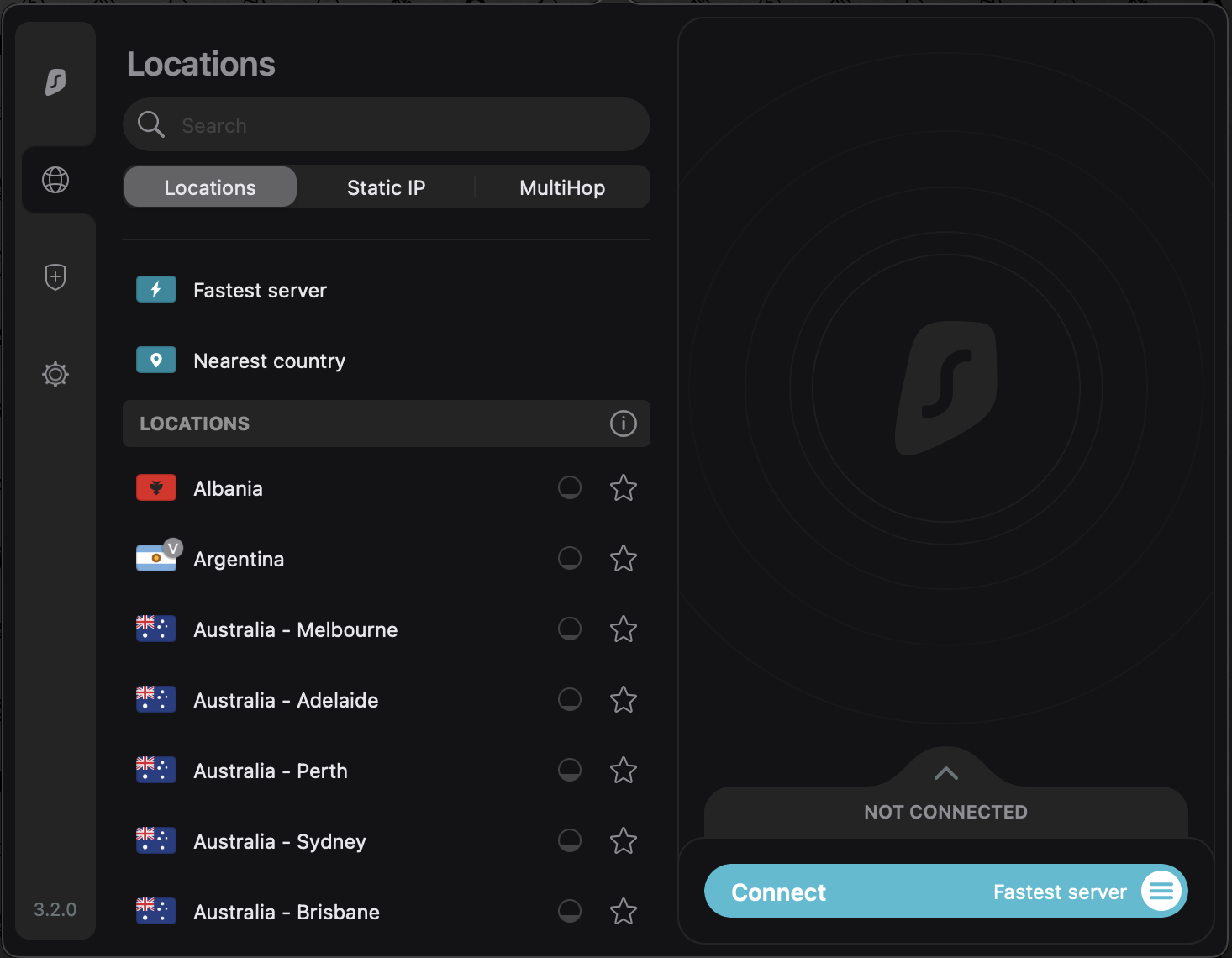
Which one to choose depends on your preferences. Static IP means you always have the same IP address, whenever you use that specific server and reconnect – this gives you faster speeds and better access to geo-restricted content. On the downside, that IP address is also always linked to you.
The MultiHop option gives you better security, by sending traffic through two different servers. Users’ speeds will be slower, but the IP address is masked better. This is also known as a Double VPN.
All of Surfshark’s servers are 100% RAM only – Surfshark is one of the first VPN providers in the industry to upgrade all its servers to a RAM-only infrastructure. RAM-only servers are more secure as no information can physically be taken from them (should any malicious third party gain access to them), and any information on the hard drive is automatically wiped off whenever the server is turned off.
Additionally, every server on Surfshark’s network offers private DNS, as well as leak protection when using the IPv4 stack, ensuring your requests won’t be accessible in an unencrypted format.
Surfshark has also recently introduced its new Nexus technology which connects all of Surfshark’s VPN servers into a single, global network. This means, that instead of going through a single VPN tunnel, your traffic is routed through an entire network of servers. As a result, your VPN’s security and privacy are improved, its performance is stabilized, and the connection speed is enhanced.
Defense Against Malware and Data Breaches
Malware is software (like a program or file) that is harmful to your computer and could be used by scammers to steal your data. You can get malware through a variety of ways, but some of the most common are by accidentally clicking on an infected website or email, or by downloading an infected file.
VPNs can’t always help against malware, as they don’t prevent you from opening links or making downloads. However, Surfshark could help prevent malware from carrying out its intended task by making it harder for the malware to connect with its handler to transfer data or receive commands.
Additional Protection
For greater protection, Surfshark has an antivirus feature in its Surfshark One bundle, which you can add to your VPN subscription for an additional monthly cost. This will notify you immediately should you download any malicious files, schedule scans to check for malware, and remove any threats in real-time before they can harm your device. It will also inform you if any databases containing your sensitive data (such as email, password, ID, or bank information) have been breached.
In addition, Surfshark One subscribers have access to Incogni. This tool contacts data brokers (organizations that collect and sell data) to request they delete any data they have on you. This should help prevent online marketing ploys from targeting you.
Incogni: Personal Data Removal Service
Surfshark recently introduced Incogni, a personal information removal service to help you take back control of your data. Incogni allows you to opt out of the collection and sale of your personal information by data brokers and people search sites.
Typically, the steps required to remove yourself from the internet are a hassle to deal with. But Incogni makes the process easier. By removing your personal information, you can lower your risk of invasion of privacy, scams, and even identity theft. What’s more, it’s the most comprehensive data removal service on the market and is fully automated.
The prices of Incogni are:
- 1-month plan for $12.99/mo (plus tax);
- 1-year plan for $6.49/mo (billed $77.88 annually (plus tax)).
We haven’t tried Incogni yet, but once we’ve completed our test, we’ll post our results on this review.
Bypasser (Split Tunneling)
(Available on Android, Windows 7,8, 10, 11, and routers.)
Bypasser is what Surfshark calls VPN split tunneling (and is very similar to whitelisting). It allows you to choose which information uses the VPN connection (and is therefore encrypted) and which can be transmitted via the standard internet.
This is useful if you find some sites are slow on the VPN, as you can make those run faster by having them bypass the VPN, while other services you use remain protected. It’s also helpful if a legitimate site, like your bank, needs to confirm your real location.
Reverse Bypasser (Route via VPN)
(Available on Android, Windows 7,8, 10, 11, and routers.)
In contrast to the standard Bypasser, Surfshark’s Reverse Bypasser allows you to choose which sites will only go through the VPN (and therefore will always be encrypted). Any other apps and websites will be able to see your real IP address.
P2P Servers
Peer-to-peer (P2P) networks allow all connected computers access to all or some part of the same resources and data. This lets you share files fast and safely, without the use of a central server (known as torrenting).
All Surfshark servers support P2P traffic.
Which Apps & Devices Are Supported?
Here are some other questions our readers have asked us about Surfshark.
How to Install
Surfshark has an app for each of the platforms it’s available on (iOS, Android, macOS, Windows, Amazon Fire TV), so installing it is as simple as clicking “download” on the relevant app store for your device. Each option is linked on Surfshark’s website, so you don’t even need to search for it.
There are also dedicated user guides for each app, platform, and browser extension on Surfshark’s “Setup & Installation” section within its Help Centre.
If you’re unable to install the app, there are walk-through guides on how to install Surfshark manually.
Setting up on a router is slightly more complicated, as you can’t simply download an app. However, even this isn’t particularly complicated, if you follow one of the many step-by-step illustrated guides Surfshark offers.
Though it depends on the exact router you’re using (and Surfshark explains how to find out if your router is compatible), you should just need to find your Surfshark credentials (which can be located in the “setup” part of your Surfshark account), choose a server, and then configure your chosen protocol. Again, this is all explained in detail in the “Router” section of Surfshark’s Help Centre.
VPN Server Locations
Surfshark has servers in 19 US states across 24 cities . Last updated: 29/03/2026
-
Massachusetts
(MA)
1 city
Boston
-
New York
(NY)
3 cities
Buffalo, Latham, New York
-
Illinois
(IL)
1 city
Chicago
-
Michigan
(MI)
1 city
Detroit
-
Missouri
(MO)
1 city
Kansas City
-
Nebraska
(NE)
1 city
Omaha
-
Florida
(FL)
1 city
Miami
-
Georgia
(GA)
1 city
Atlanta
-
North Carolina
(NC)
1 city
Charlotte
-
Virginia
(VA)
1 city
Ashburn
-
Tennessee
(TN)
1 city
Nashville
-
Texas
(TX)
2 cities
Dallas, Houston
-
Arizona
(AZ)
1 city
Phoenix
-
Colorado
(CO)
1 city
Denver
-
Nevada
(NV)
1 city
Las Vegas
-
Oregon
(OR)
1 city
Bend
-
Utah
(UT)
1 city
Salt Lake City
-
Washington
(WA)
1 city
Seattle
-
California
(CA)
3 cities
Los Angeles, San Francisco, San Jose
US Server Locations
Customer Support
Live Chat
Surfshark offers 24/7 live chat with support agents who can help with technical issues, billing questions, and setup guidance. It’s the fastest way to get help at any hour.
Email Support
You can also reach Surfshark’s support team via email for less urgent queries or issues that need more detailed investigation.
Knowledge Base
Surfshark maintains a comprehensive Help Center containing step-by-step guides and video instructions for everything from getting started and common issues, to billing and account questions. It also has an impressive range of setup guides and tutorials for all supported platforms and devices, including routers.
Each help article shows when it was last updated, with the majority checked within the previous two weeks. The longest gap we found was three months.
Community & Forums
Surfshark maintains an active blog with new articles posted every couple of weeks, usually covering important service updates or helpful tips on VPN technology.
Who Isn’t Surfshark Right For?
Based on our testing and research:
9-Eyes jurisdiction – Surfshark is based in the Netherlands, a member of the 9-Eyes intelligence-sharing alliance. While Surfshark maintains a no-logs policy audited by Deloitte, users in high-risk situations – journalists, activists, whistleblowers – may prefer a VPN based outside this alliance entirely.
Consider instead: Proton VPN (Switzerland) or IVPN (Gibraltar)
Corporate consolidation – Surfshark merged with Nord Security in 2022. Both brands now operate under the same parent company. While they are run as separate services, users who prefer independently-owned providers should consider Proton VPN or Mullvad instead.
Consider instead: Proton VPN or Mullvad
Fewer independent audits – Surfshark launched in 2018 and has completed two Deloitte audits. Established competitors like NordVPN (4 audits) and ExpressVPN (4 audits including server architecture) have longer audit histories. For users where audit depth matters, this is a relevant gap.
Surfshark Competitors
| Surfshark | ExpressVPN | NordVPN | CyberGhost | Private Internet Access | |
|---|---|---|---|---|---|
| Best rate | $1.99/mo | $3.49/mo | $3.09/mo | $2.19/mo | $2.19/mo |
| Monthly price | $15.45 | $12.99 | $12.99 | $12.99 | $11.99 |
| Servers | 4,500+ | 3,000+ | 8,400+ | 9,700+ | Undisclosed |
| Countries | 100 | 105 | 167 | 100 | 90 |
| Devices | Unlimited | 8 | 10 | 7 | Unlimited |
| Jurisdiction | 🇳🇱 Netherlands ⓘ | 🇻🇬 BVI ⓘ | 🇵🇦 Panama ⓘ | 🇷🇴 Romania ⓘ | 🇺🇸 USA ⓘ |
| Money-back | 30 days | 30 days | 30 days | 45 days | 30 days |
| Kill switch | ✓ | ✓ | ✓ | ✓ | ✓ |
| Split tunneling | ✓ | ✓ | ✓ | ✓ | ✓ |
| No-logs audited | ✓ | ✓ | ✓ | ✓ | ✓ |
| Dedicated IP | ✗ | ✗ | ✓ | ✓ | ✓ |
| Open source | ✗ | ✗ | ✗ | ✗ | ✓ |
| RAM-only servers | ✓ | ✓ | ✓ | ✓ | ✓ |
| Ad/tracker blocker | ✗ | ✗ | ✗ | ✗ | ✗ |
| Our rating | 8.2/10 | 8.6/10 | 8.8/10 | 7.4/10 | 7.2/10 |
| Review | Read review → | Read review → | Read review → | Read review → | Read review → |
Our Verdict
Based on our hands-on testing and data analysis, here is our overall assessment of Surfshark.
Frequently Asked Questions
Is Surfshark trustworthy?
Yes, Surfshark is trustworthy. Being based in the Netherlands, Surfshark is legally bound to comply with strict GDPR standards, and its comprehensive no-logs policy has been confirmed with multiple independent audits.
In addition, Surfshark uses RAM-only servers that each have their own DNS leak protection and obfuscation settings, and when paired with Surfshark’s industry-standard encryption, choice of protocols, and privacy-focused features (such as IP rotator and camouflage mode), its VPN is a secure choice.
What’s Surfshark’s company history?
Surfshark is a cybersecurity company based in the Netherlands, focused on developing humanized privacy and security solutions.
Its VPN service launched in 2018 and is now one of the major VPN brands worldwide, having grown to include the new WireGuard protocol, an additional package of antivirus and alert features (known as its Surfshark One bundle), and a single, global network of 100% RAM-only servers spanning 100 countries across Europe, America, Asia, and Middle East & Africa.
In 2022, Surfshark merged with Nord Security (which owns the VPN brand NordVPN), at which time it received a valuation of $1.6 billion. NordVPN and Surfshark remain separate, independent businesses, though both are two of the five founding members of the VPN Trust Initiative, which aims at fostering cooperation in the VPN industry.
Can you be tracked using Surfshark?
No. There is no way to be tracked using a Surfshark, as long as the VPN is encryption and working as expected. Surfshark uses industry-standard AES-256 encryption and ensures DNS leak protection, so your web traffic, data, and traffic cannot be tracked while you are connected to Surfshark.
In addition, Surfshark offers extra features that ensure users’ privacy and anonymity, such as camouflage mode, multi-hop, IP rotator, and obfuscated servers.
Can you use Surfshark for Netflix?
Yes, Surfshark can be used for Netflix. Once you have active subscriptions for both Surfshark and Netflix, install Surfshark on the device or router you want to watch Netflix on. Once installed, connect to the VPN, and then open and log into your Netflix account. You can now securely stream all your favorite shows on Netflix.
For smart TVs incompatible with apps, you can use Surfshark’s Smart DNS setting to change your virtual location while streaming.
What is the monthly fee for Surfshark?
Surfshark’s monthly fee depends on the length of the subscription plan you choose, with the monthly price cheaper the longer you’re signed up. For the basic Surfshark Starter plan, monthly prices range from $15.45 to $1.99 if you pay for 24 months (+3 months free) upfront. Please note that any plan longer than one month is billed as one lump sum, and the prices don’t include tax.
Please see our “Surfshark Plans and Pricing” section above for more details.
Is Surfshark safe?
Yes, Surfshark is safe. It uses industry-standard AES-256 encryption, ensures DNS leak protection, and maintains 100% RAM-only servers. This means your data is virtually impossible to decrypt, and nothing is kept on the servers themselves should hackers gain physical access to them.
In addition, Surfshark upholds a strict no-logs policy, which has been tested and verified through multiple independent audits, and is based in a country within GDPR jurisdiction.
What is the difference between Surfshark and PureVPN?
Surfshark and PureVPN are both secure VPN providers that work across the majority of platforms and devices, with a similar price structure. While PureVPN offers more servers, Surfshark’s network spans more countries and all of its servers are 100% RAM-only, meaning they’re safer and more secure.
A Surfshark subscription also allows users to connect an unlimited number of devices simultaneously, whereas PureVPN restricts users to a maximum of 10 devices.
Unlimited devices at a rock-bottom price. Good enough for most people, not the best at anything.
Our rating scale
| Rating Rubric | |
|---|---|
| 9 - 10 | Exceptional - best in class, no significant weaknesses |
| 8 - 8.9 | Excellent - highly recommended with minor trade-offs |
| 7 - 7.9 | Good - solid choice for most users |
| 6 - 6.9 | Adequate - works but has notable limitations |
| 5 - 5.9 | Below average - consider alternatives |
| Below 5 | Not recommended |
Update history
This page was revised 51 times between June 2021 and April 2026.
Added corporate structure references with links to ownership records.
Restructured Customer Support section with dedicated subsections for live chat availability, email support, and the Help Center's step-by-step guides and video tutorials.
Linked device and money-back guarantee references to verified hub data so figures stay current.
Added WireGuard protocol details with Nexus networking architecture, Deloitte-audited privacy credentials, Netherlands jurisdiction context, and unlimited device support across all platforms.
Added company background section covering Surfshark's 8-year history since 2018.
Added RAM-only server infrastructure detail explaining how Surfshark's diskless servers protect user data.
Added ecosystem overview showing Alternative ID, Surfshark Antivirus, Surfshark Alert, and 3 more bundled products available alongside the VPN subscription.
Added table of contents with section-by-section navigation for faster access to specific topics.
Updated server network overview covering 4,500 servers across 100 countries, with interactive coverage map and nearest-server highlighting.
Redesigned quick-reference spec table showing unlimited simultaneous connections, 4,500 servers, 100 countries, AES-256-GCM encryption, and 30-day money-back guarantee.
Added source citations and verification dates to all factual claims in the Surfshark review.
Added policy change monitoring showing recent updates to Surfshark's privacy policy with paragraph-level diffs.
Added transparency tracker with transparency report data showing government and DMCA request volumes.
Reordered sections to match how readers evaluate a VPN: streaming first, then speed, privacy, features, and pricing.
Expanded privacy section with Netherlands jurisdiction analysis, Deloitte-audited no-logs policy (2 independent audits).
Improved pros and cons with more specific language grounded in test data and verified claims.
Added curated "Not Right For" section with severity-coded concerns addressing speed and compatibility limitations.
Removed outdated editorial commentary and unverifiable claims from the Surfshark review.
Added payment methods section for Surfshark covering accepted cards, digital wallets, and cryptocurrency options.
Rewrote protocol comparison covering WireGuard, OpenVPN (UDP), OpenVPN (TCP), IKEv2/IPsec with per-platform availability and security ratings.
Added platform compatibility breakdown for Surfshark showing kill switch and split tunneling availability per operating system.
Added ownership transparency section identifying Nord Security as parent company, with links to NordVPN as sibling brands.
Reorganized review content into clearer sections, moving misplaced blocks and removing layout inconsistencies.
Replaced static overview tables with live data-driven spec cards for Surfshark, ensuring pricing and server counts stay current.
Added pros/cons table, detailed overview specifications table covering 17 key features, streaming compatibility information across 8 gaming platforms and 10+ services, and expanded platform support details.
Removed verbose introductory paragraphs and restructured opening with clearer, more direct language about Surfshark's key strengths.
Restructured introduction by removing redundant opening statement and condensing overview into clearer, more focused narrative.
Restructured opening paragraphs for improved flow, added pros/cons table and overview table with 16 key specifications, expanded streaming section with platform and service compatibility details.
Restructured introduction by removing redundant opening paragraph and replacing vague phrasing with clearer, more direct language about Surfshark's market position and review scope.
Reorganized and expanded the introduction with a pros/cons table, detailed specifications overview, and restructured section headings for improved clarity and navigation.
Restructured opening paragraphs for improved clarity and removed "comprehensive" descriptor from review introduction.
Restructured introduction with improved clarity and flow, reorganized Pros & Cons table, and added overview table with key specifications including server count, encryption protocols, and supported platforms.
Reorganized introduction paragraphs for improved flow and removed "comprehensive" descriptor before "Surfshark review."
Rewrote opening paragraph for clarity and removed "comprehensive" descriptor from review introduction.
Restructured opening section with clearer headline and improved introduction flow, reorganized pros/cons with supporting callouts, and added overview table with key specifications.
Rewrote introduction to be more concise, removed "comprehensive" descriptor, and reorganized opening paragraphs for better flow.
Restructured introduction, added brand background section with company history and GDPR compliance details, created pros/cons list, and added overview table with specifications.
Restructured opening paragraphs for better flow, added brand background section with company history and GDPR compliance details, and created overview table with 16 key specifications.
Restructured introduction by moving opening summary sentence to standalone paragraph, expanding brand background section with company history and regulatory compliance details.
Restructured introduction, expanded brand background with merger details and GDPR compliance information, and added overview table with 16 key service specifications.
Restructured introduction by expanding brand background section with merger details, GDPR compliance explanation, and VPN Trust Initiative membership while streamlining opening paragraphs.
Restructured introduction with expanded company background, added pros/cons section, and created overview table with 16 key specifications.
Restructured opening section by moving introductory paragraph before pros/cons list and reorganizing content flow for better readability.
Restructured introduction by breaking up a lengthy paragraph into multiple focused sections with clearer hierarchy and added a quick-reference pricing callout.
Restructured opening section by moving introductory overview higher in the page and expanding the pros & cons list with three new items.
Added introductory paragraph, pros/cons list, detailed overview table, and streaming compatibility section to provide readers with quick reference information.
Corrected spelling error "Suirfshark" to "Surfshark" and fixed incomplete sentence about OpenVPN protocol options.
Corrected spelling of "Surfshark" and fixed platform typo ("Linus" to "Linux"), plus rewrote multiple sections for clarity and added detailed testing data on DNS leaks.
Added Surfshark review content including pricing, features table, advantages list, leak testing results, logging policies, protocol details, and streaming capabilities analysis.
Corrected grammar ("That is not lost on Surfshark" phrasing), fixed incomplete sentence in Protocols section, and clarified logging policy language throughout.
Corrected 3 spelling errors ("1,99" to "$1.99", "know" to "known", "ap" to "app") and removed redundant text about unique user IDs.
Who Owns Surfshark?
Nord Security Inc.
Surfshark was acquired Feb 2022.
Also owns NordVPN, Atlas VPN.
Run our independent leak test while connected to your VPN and see the results for yourself. We check for IP, DNS, and WebRTC leaks in under 30 seconds. Every test adds to our public dataset.
Join Our Test Panel →Surfshark Alternatives
Considering Surfshark? See how it compares
Based on independent testing data and specifications from each provider.



How we test VPNs
Our testing process involves purchasing each VPN with our own money and installing it on Windows, macOS, and mobile devices. We run a three-stage leak test (IP, DNS, and WebRTC) multiple times across different servers to check for data exposure.
We also test streaming access, kill switch reliability, and split tunneling functionality. All testing is conducted without notifying the provider. Specifications and pricing are verified directly from the provider's website.
Our full testing methodology is published at vpntesting.com/methodology.